
Automatic Passenger Counting (APC) in Trains and Buses with Cameras
Buses, trains, subways, and trams already have security cameras installed. Why not put them to more efficient use? Discover how AI-powered video analytics turns your existing camera infrastructure into a precise, automated passenger counting system — reducing hardware costs while giving you real-time data on occupancy, passenger flows, and utilization.
Published
September 4, 2026

Key Facts
Automatic passenger counting in vehicles uses existing security cameras and AI video analytics to determine occupancy, without the need to install additional sensors. As urbanization increases demand for public transport, operators need continuous and precise passenger data to plan routes, schedules, and fleet capacity. Since security cameras are already installed in most buses, trains, subways, and trams for passenger safety, they can be repurposed for passenger counting. This article focuses specifically on camera-based counting in trains; for a full comparison of all automatic passenger counting technologies, read our overview of automatic passenger counting systems.
How does video analytics work for automatic passenger counting?
Security cameras as intelligent sensors
Security cameras are often already installed in trains, subways, and trams to enhance passenger safety and deter vandalism. Using these existing cameras instead of installing dedicated sensors can reduce the cost of passenger counting by up to 80%.
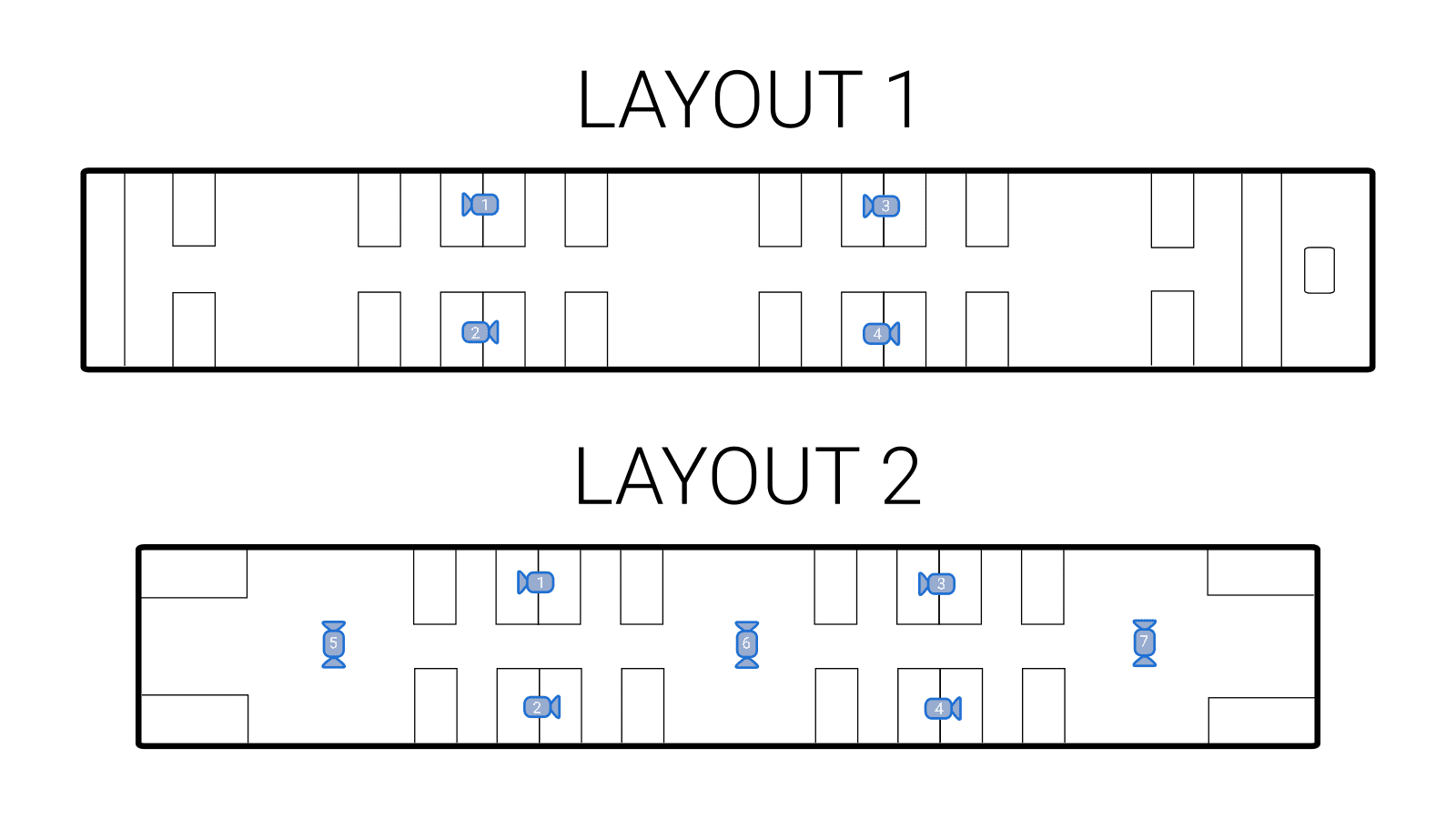
The figure below shows two typical vehicle floor plans along with the position of the installed cameras. As shown, several cameras are installed per carriage to cover the entire area. Depending on the mounting location, the achievable counting results differ:
- Occupancy application:
The cameras capture only the vehicle's interior and measure the total number of passengers as well as the change in occupancy between stations. This corresponds to floor plan 1.
- Count-line application:
The cameras additionally capture the entrance areas and measure the exact number of passengers boarding and alighting at each station. This requires the additional cameras aimed at the entrances (5, 6, and 7), shown in floor plan 2.
The actual counting process
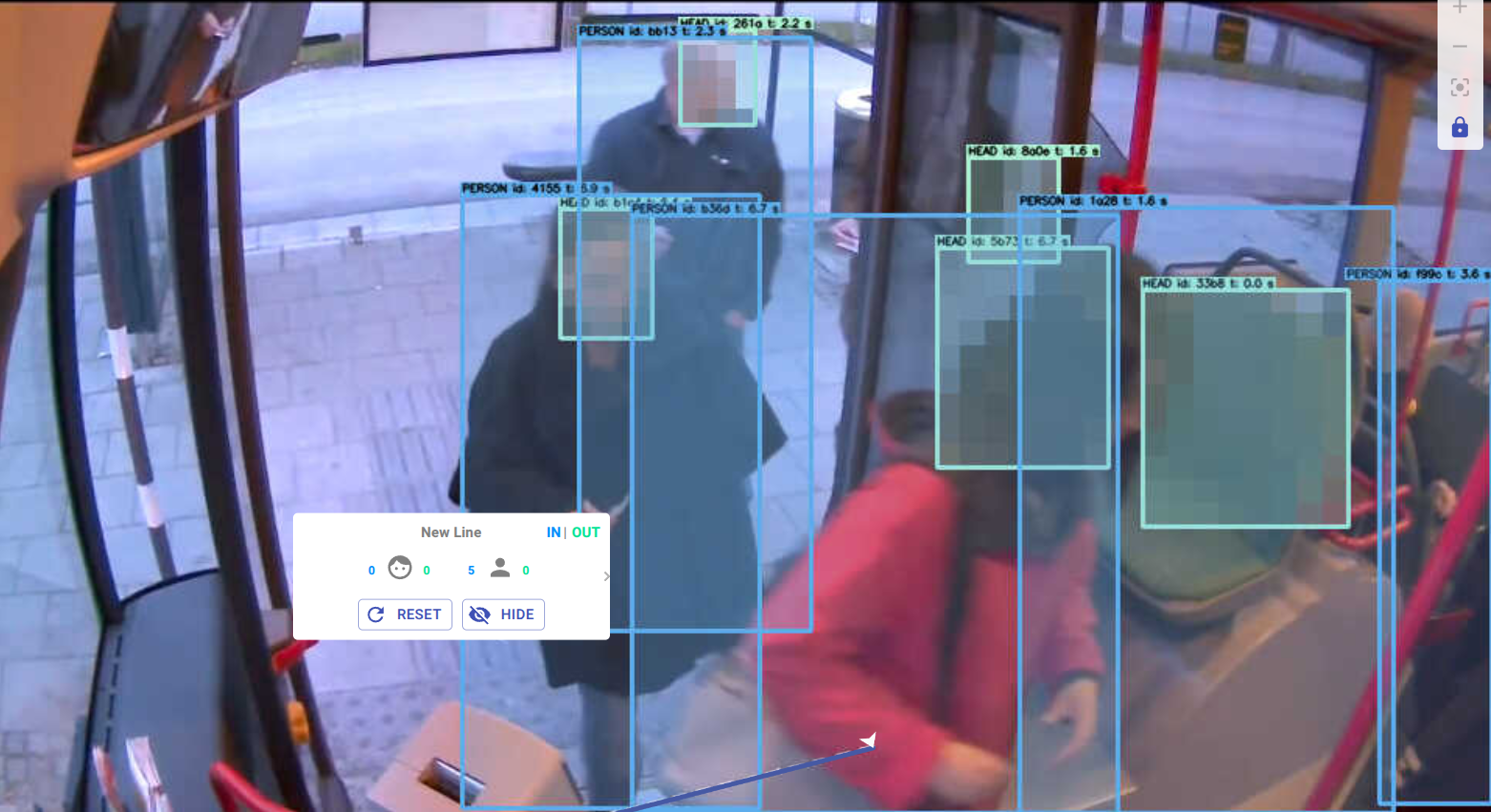
The colored overlays in the image below illustrate the counting zones. As you can see, cameras one through four form four counting zones (yellow, red, green, blue) in which passengers are counted. Adding up the numbers from each zone gives the vehicle's total occupancy.
In the second layout, six additional counting lines are shown as blue horizontal lines, capturing the passengers boarding and alighting as seen by cameras 5, 6, and 7.

Following this example for a single carriage, passenger counting can be carried out for an entire vehicle. With further aggregation, it can even cover the entire public transport network.
Processing the count results
Many cameras already installed in trains aren't powerful enough to carry out passenger counting on their own. The video data must be processed using additional computing capacity, which can be provided in three ways:
- On the camera:
By extending cameras with apps, the counting algorithm can run directly on the device, eliminating the need for a separate server in the vehicle. Learn more about the Isarsoft Perception Axis App for the ARTPEC-9- / CV75 chipset. - Edge server in the vehicle:
Processing happens locally, which keeps bandwidth requirements low, since only the final count data needs to be transmitted. - On a server in the operator's data center:
Processing takes place after transmission from the vehicle, allowing operators to retain full control over their own infrastructure.
In all cases except on-camera processing, a data connection from the vehicle to the operator is required. Bandwidth can be reduced by evaluating only compressed, low-resolution images at set intervals, rather than processing every frame in real time.
What insights does APC with video analytics provide?
Beyond simple passenger counting, camera-based passenger counting turns rail vehicles into a continuous source of operational data. Since the same video stream can be analyzed for multiple metrics simultaneously, operators get a far more comprehensive picture than counting alone provides:
- Vehicle occupancy:
Total number of passengers on board at any point along the route. - Boardings and alightings per stop:
How many passengers board and alight at each station. - Occupancy trends over time:
Comparison of occupancy across hours, days, or routes to identify over- or underserved connections. - Utilization of multi-purpose areas:
How much luggage, how many bikes, or strollers is there? - Identification of peak loads:
Pinpointing exactly when and where vehicles reach their capacity limits. - Aggregation at route and network level:
Combining data across carriages, vehicles, or the entire fleet for network-wide planning.
All of this data is available in real time in your BI dashboard through the Isarsoft Perception video analytics software.
.png)
Differences between APC in buses and rail vehicles
Although the underlying technology is the same, the implementation of APC differs in some respects between buses and rail vehicles such as trains, subways, and trams. Vehicle structure, stop patterns, connectivity, and power supply all determine which setup is best suited in each case. The table below summarizes the key differences operators should consider when rolling this out fleet-wide.
From passenger counting to operational intelligence
Camera-based passenger counting in trains is a cost-effective method for capturing passenger numbers. It also turns existing infrastructure into a real-time source of operational insight, without installing a single new device in the vehicle. Amid growing fleets and constantly changing schedules, this data enables operators to plan routes and capacity based on actual passenger volumes, rather than relying on periodic manual surveys. This is exactly the foundation Isarsoft has built specifically for operators of trains, subways, and trams. Learn how Isarsoft supports public transport operators.
FAQ
Can't find the answer to your question?
Contact us now!
Can exisitng on-board security cameras be used for passenger counting?
Yes. Security cameras already installed for security purposes in trains, subways, and buses can also be used for passenger counting, which can reduce counting costs by up to 80% compared to installing dedicated sensors.
What is the difference between an "occupancy" and a "counting line" camera application on trains?
An occupancy application counts people within a camera's zone to estimate overall occupancy, while a counting-line application is positioned at doors to measure the exact number of passengers boarding and alighting at each stop.
Where does the passenger count calculation take place: onboard or in the cloud?
This can happen on the vehicle's onboard computer, on a server in the operator's data center, or in the cloud, depending on available bandwidth and infrastructure. Onboard processing requires the least bandwidth.
How is passenger counting configured on existing train cameras?
Configuration is done through a drag-and-drop interface: counting zones are drawn as rectangles for occupancy counting, or a line is placed across a doorway for counting-line applications, without any need to physically modify the camera.
Explore More Publications

6 Reasons for Isarsoft Video Analytics
Isarsoft Perception turns existing security cameras into smart sensors that count people, track customer journeys and detect vehicles, with privacy built in. Here are six reasons why transit operators, airports, retailers and museums choose Isarsoft video analytics.
.png)
Artwork Protection at Kunstmuseum Stuttgart with Isarsoft
To protect priceless artworks without resorting to ropes, glass cases, or rigid sensor grids, Kunstmuseum Stuttgart implemented Isarsoft Perception's AI-powered video analytics software. By converting its existing security camera infrastructure into invisible, precision-tuned protection zones, the museum is able to automate artwork protection in real time.
Monitoring Occupancy and Seat Availability in Public Transportation
Passenger counts tell operators how many people are on board, not where the remaining capacity is or what kind it is. We look at how seat-level and multifunctional-area occupancy monitoring gives transport operators that missing data.

Automatic Passenger Counting (APC) Systems - An Overview
Discover different technologies for Automatic Passenger Counting (APC) their strengths and weaknesses, and the advantages of the AI-powered solution by Isarsoft.

How to visualize Passenger Flow in Public Transport Networks
Understanding how passengers move through stations, vehicles, and the wider network is essential for transit operators. Explore how video analytics turns raw movement data into clear, actionable passenger flow visualizations.
.png)
On-Camera People Counting & Video Analytics with Isarsoft Perception Axis App
Isarsoft Perception now runs directly on the latest Axis cameras, eliminating the need for additional edge servers. Discover how on-camera analytics is transforming onboard vehicle deployment and opening the door to use cases previously limited by budget or space constraints.